Resolution Explained
Resolution Explained
People use the term "resolution" loosely. When asking what resolution something is the answer can be given in many ways, such as in pixels, dpi, or megapixels. It's even used when describing sharpness and image detail.
Pixels vs DPI vs PPI vs Resolution vs Image Size vs Megapixles vs File Size vs Scan Resolution
What's the difference between pixels and resolution? It's kind of the same thing - they are all related to each other. Having only a couple numbers of any of the above you can calculate or estimate all the other information. I'll show you some simple math, but I must explain some details. Everything depends on pixels, pixels, and pixels.
What is resolution?
Here is a list of terms and what part of an image they refer to.
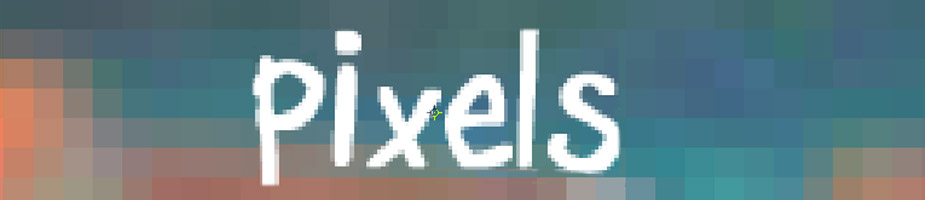
Pixel: A tiny solid color spec. An image is created with millions of these tiny squares. See the header graphic above.
DPI: Dots per inch usually referred to how many dots a printer plots in a inch. The standard is 300 dpi for most ink jet printers. Most printers optimum quality is 300 dpi even if they don't use dots. Out of all printer types ink jet printers are more forgiving and can print a great image at 240 dpi. More on this later.
PPI: Pixels per inch is used for computer monitors and other devices with screens. Most screens display images at 72 ppi.
Resolution: Usually refers to pixels, but mainly describes how much detail an image has and how large it can be printed or magnified before it starts to pixelate. High resolution can mean more pixels crammed into less space - for example 72 dots per inch vs 300 dots per inch. In the end the higher resolution image will just have more pixels.
Image Size: This is the dimension of an image - usually measured in inches. This is important to know mainly when printing. Dividing the pixels by dpi gets you how large an image can print.
Megapixel: This is how cameras are described. Camera producers make it seem like the more megapixels a camera has that it's better quality - that is false. It's all about capturing light - some cameras don't do so well in low light situations. You can have a 5MP camera take better photos than a 12MP camera. Anyway megapixels describes how large an image is by multiplying the height and width of it's pixels.
ie: 2000px x 3000px = 6,000,000 pixels = 6MP camera sensor chip.
File Size: This is how much space (bytes) an image takes up on the hard drive. A low res image can be 50kb and a large image can be a 15mb file. You can get an idea of how large you can print an image by looking at the file size. Usually A 5mb JPG should get you an 8x10 print because I expect it to have 2400px x 3000px. Only time the file size could be misleading is if the image was compressed into a 2mb file. A 1mb JPG file should get you a decent 4x6 photo.
Scan Resolution: This is basically the dpi setting on a scanner when scanning a print or negative to make a digital image. To reproduce a 4x6 picture you must scan it at 300 dpi to print it out at the same size. If you want to double the size and print it at 8x12, you must double the dpi to 600 dpi. In the end your 8x12 image will be printed at 300 dpi.
*Note on scanners: Some high end scanners will not export the image at the dpi a photo was scanned, but export the image at 72 ppi. What matters, and the number that doesn't change, is the pixel count.
ie: You scanned a 4x6 print at 300dpi which gives you 300dpi x 6" wide = 1800 pixels. When the scanner exports the image it may convert it to 72dpi - doing so did not degrade it because now the image size is greater. Instead of having a 6" image at 300dpi you might have (1800 px / 72dpi) = 25 inches on your screen. See... the width of the image still has 1800 pixels.
Calculating Pixels
Ok - finally the mathematical explanation on how all the terms relate to each other.
Lets stick with the same samples numbers I used above. 1200 x 1800 pixels.
What print size is the optimum resolution. Well, just divide the pixels you have by 300 dpi. 1200/300 = 4" and 1800/300 = 6" gives you a 4x6 inch print.
If printing this image on an ink jet you can easily get away with 240 dpi which will print your image at 1200/240 and 1800/240 = 5" x 7.5"
Inches x DPI = Pixels. You can change the inches and dpi and keep same resolution in pixels.
ie: 6" x 300dpi = 1800 pixels and 2" x 900dpi = 1800 pixels. See a different image size can still be the same photo size in pixels and in file size. Some programs let you change image detail like size, dpi, and pixels.
When you do change the inches or dpi, the numbers usually adjust to keep the same pixel value, but you can force the image and overwrite the other two values - doing so can damage your quality. You can trick a printer by forcing or adding more pixels (called up scaling), but the image will still print as if it was a low resolution image. You can't change a 480 x 640 pixel image to 2000x3000 and expect a great 8x10 print.
How big is the image displayed on my screen. Well divide the pixels by the screen resolution. 1800/72 = 25" and do the same for the other dimension.
What resolution would I get if I scanned a 4x6 print at 300 dpi vs 600 dpi.
Well 4"x300dpi = 1200px and 6"x300dpi= 1800px. So you would get a 1200x1800 image.
At 600 dpi you would get double. 4x600 and 6x600 = 2400 pixels x 3600 pixels. This give you a printed photo double the size. 3600 pixels divided by 300 = 12". So you would get an 8x12 photo. Since your doubling the scan dpi it's easier to just double the pixels to get the same results.
Now if you were to scan a negative to make a 4x6 print your scan resolution will need to be calculated by pixels needed divided by the actual size of negative. (a negative frame size is 1"x1.5") 1800px/1.5"= 1200 dpi. (output pixels needed for printing divided by the actual print or negative size = dpi required).
A camera setting for making a 4x6 print is 1200x1800 = 2,160,000 = 2.2MP Camera. For printing an 8x12 photo you will need an 8.6MP camera (multiply 2400 x 3600).
Quality depends on Pixels
Everyone thinks having more pixels is better - wrong! Well, up to a certain point. Oversizing is a waste of time and space. You just end up working with a super large file size which takes longer to open and uses up more hard drive space. You will never get more detail when printing because there is a maximum limit for quality. If you are printing an 8x10, all you need is 3000 pixels which gives you about a 6mb file size. The printer ignores anything over 3000 pixels since it prints at 300 dpi. Why create an image where you have 12,000 pixels, a 90mb file, when all you need is an 8x10 print.
Zooming in or Cropping in
When enlarging part of a photo by zooming in or cropping in - you will need more pixels to start with. You can't crop into a 4x6 photo (1200x1800 pixels) and zoom in half way to enlarge part of an image into to a 4x6 print. In this case you should of started with 2400x3600 pixels and cropped out the rest of the photo to still keep your 4x6 print quality. This is the only time more resolution is needed. Zooming in is more for computer screens - the more pixels you have the more you can zoom in before the image starts to pixelate.
Screen PPI vs Print DPI
Images are much larger on monitors than when printed. Most screens display images at 72ppi and printers print at 300dpi. A 1200 x 1800 pixel image is 25" wide on the screen and only 6" when printed. Just divide the ppi or dpi by the pixels to the image size in inches. Images on screens and devices always look good, but for printing them out you will need about 4 times more the resolution to make a great print.
JPEG Compression
When saving an image to a JPG, most programs will have a compression settings. Saving a 1200x1800 image in photoshop at the least compression (#12) will give you a 1.5mb file size. Saving it at level 10 compression will cut the file size in half giving you a compressed file of 750kb. Compressing the file more will really start to degrade the quality. You will not notice it in the detailed parts of the image, but in the solid color parts - like in the blue sky. This is where the compression first starts to break down and it will look pixelated. Compressing the image too much will not change the resolution (pixel count). This could be misleading to the printer because amount of pixels your image has is great, but the print quality looks pixelated.
Compression vs Downsizing
Both of these will damage your image in different ways.
Image compression takes away details by removing color information. It's kind of hard to explain ,but here it goes. Each pixel has a number value (0-256) in either the Red, Green, and Blue channel. Lets say you have a photo with a nice blue sky. Compressing the image will take an average blue value and reduce every fourth pixel to hold less color. So one out of every four pixels will not be a vibrant blue, but grayed out slightly. That's why the first place you see damage in the sky or solid colors.
Downsizing is when you reduce the pixel count lets say from 3000px to 480px. If you downsized to make a smaller file size you will not be able to print large photos anymore. This reduced the print size from 10" to 1.5".
It's important to not save over or overwrite the original image after you make changes. It's good practice to save it as a new file name so your original can be a backup.
Does transferring an image degrade it?
Copying an image from one device to another doesn't degrade the quality. Even emailing is a transfer, but with Apple products like a Mac or iPhone you have to select to send the original or actual size - or else it will downsize your image. Opening the image and resaving it does recompress it, but you can minimize the amount of degradation by selecting to not compress the image (save as best quality if you have that option).
How big can I print?
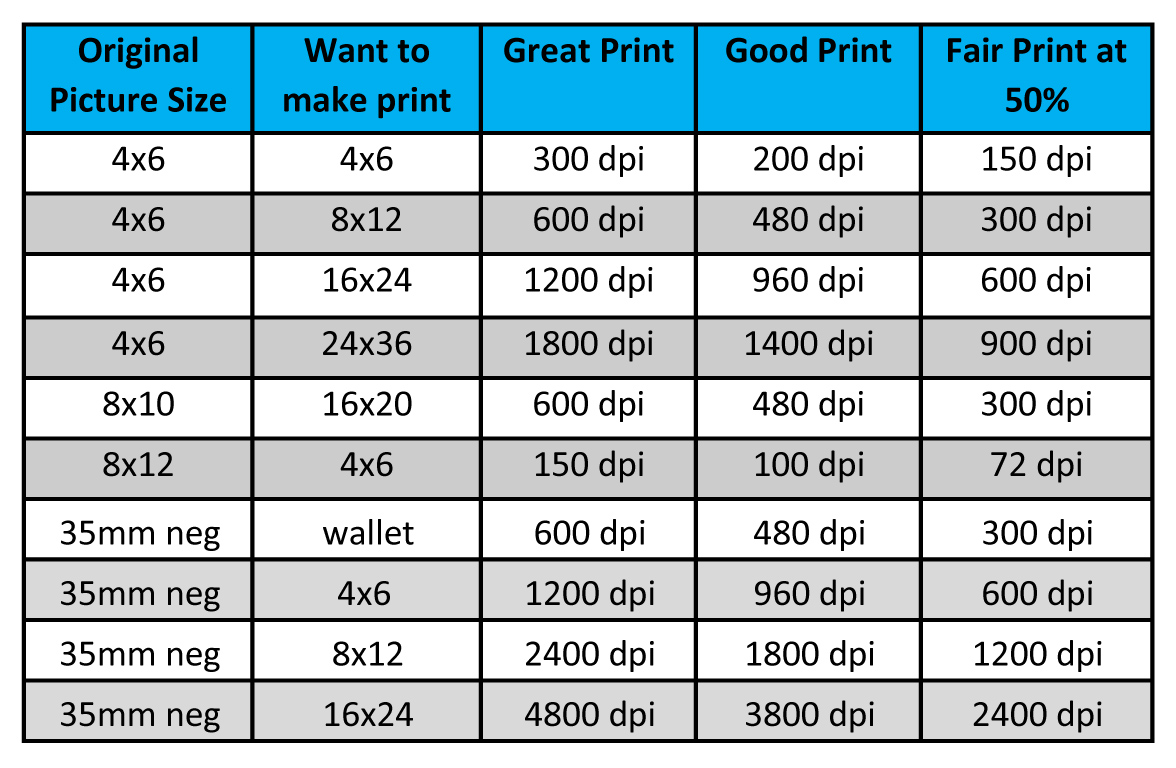
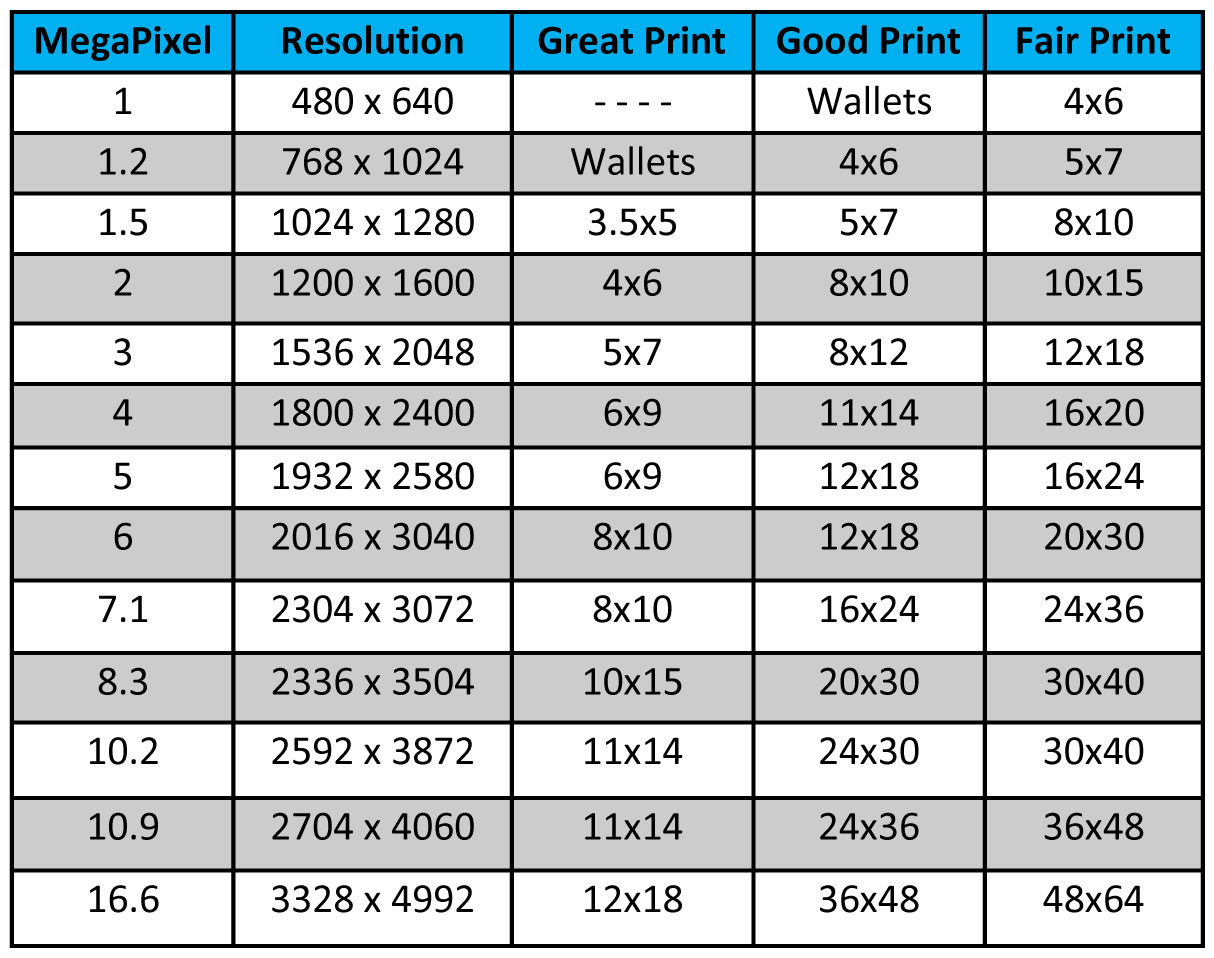
Optimum quality is pretty much going to be 300 dpi, but there are lots of other factors too. Ink jet printers don't need 300. How far will people be when they view the photo. Most people are fine with images printing equivalent to 200 dpi. That's about when, up close, you will see the image starting to get soft or slightly pixelated. If you stand back a couple feet it will look good. Now for an extreme horrible print example lets take a look at a billboard sign you see on the freeway. Those are huge prints and usually printed at 72dpi. Looking at it up close you will see tons of blocky, jagged pixels, but stand back 50ft and it looks excellent. Here is a chart for a quick guide on quality.
Print Size Chart
People use the term "resolution" loosely. When asking what resolution something is the answer can be given in many ways, such as in pixels, dpi, or megapixels. It's even used when describing sharpness and image detail.
Pixels vs DPI vs PPI vs Resolution vs Image Size vs Megapixles vs File Size vs Scan Resolution
What's the difference between pixels and resolution? It's kind of the same thing - they are all related to each other. Having only a couple numbers of any of the above you can calculate or estimate all the other information. I'll show you some simple math, but I must explain some details. Everything depends on pixels, pixels, and pixels.
What is resolution?
Here is a list of terms and what part of an image they refer to.
Pixel: A tiny solid color spec. An image is created with millions of these tiny squares. See the header graphic above.
DPI: Dots per inch usually referred to how many dots a printer plots in a inch. The standard is 300 dpi for most ink jet printers. Most printers optimum quality is 300 dpi even if they don't use dots. Out of all printer types ink jet printers are more forgiving and can print a great image at 240 dpi. More on this later.
PPI: Pixels per inch is used for computer monitors and other devices with screens. Most screens display images at 72 ppi.
Resolution: Usually refers to pixels, but mainly describes how much detail an image has and how large it can be printed or magnified before it starts to pixelate. High resolution can mean more pixels crammed into less space - for example 72 dots per inch vs 300 dots per inch. In the end the higher resolution image will just have more pixels.
Image Size: This is the dimension of an image - usually measured in inches. This is important to know mainly when printing. Dividing the pixels by dpi gets you how large an image can print.
Megapixel: This is how cameras are described. Camera producers make it seem like the more megapixels a camera has that it's better quality - that is false. It's all about capturing light - some cameras don't do so well in low light situations. You can have a 5MP camera take better photos than a 12MP camera. Anyway megapixels describes how large an image is by multiplying the height and width of it's pixels.
ie: 2000px x 3000px = 6,000,000 pixels = 6MP camera sensor chip.
File Size: This is how much space (bytes) an image takes up on the hard drive. A low res image can be 50kb and a large image can be a 15mb file. You can get an idea of how large you can print an image by looking at the file size. Usually A 5mb JPG should get you an 8x10 print because I expect it to have 2400px x 3000px. Only time the file size could be misleading is if the image was compressed into a 2mb file. A 1mb JPG file should get you a decent 4x6 photo.
Scan Resolution: This is basically the dpi setting on a scanner when scanning a print or negative to make a digital image. To reproduce a 4x6 picture you must scan it at 300 dpi to print it out at the same size. If you want to double the size and print it at 8x12, you must double the dpi to 600 dpi. In the end your 8x12 image will be printed at 300 dpi.
*Note on scanners: Some high end scanners will not export the image at the dpi a photo was scanned, but export the image at 72 ppi. What matters, and the number that doesn't change, is the pixel count.
ie: You scanned a 4x6 print at 300dpi which gives you 300dpi x 6" wide = 1800 pixels. When the scanner exports the image it may convert it to 72dpi - doing so did not degrade it because now the image size is greater. Instead of having a 6" image at 300dpi you might have (1800 px / 72dpi) = 25 inches on your screen. See... the width of the image still has 1800 pixels.
Calculating Pixels
Ok - finally the mathematical explanation on how all the terms relate to each other.
Lets stick with the same samples numbers I used above. 1200 x 1800 pixels.
What print size is the optimum resolution. Well, just divide the pixels you have by 300 dpi. 1200/300 = 4" and 1800/300 = 6" gives you a 4x6 inch print.
If printing this image on an ink jet you can easily get away with 240 dpi which will print your image at 1200/240 and 1800/240 = 5" x 7.5"
Inches x DPI = Pixels. You can change the inches and dpi and keep same resolution in pixels.
ie: 6" x 300dpi = 1800 pixels and 2" x 900dpi = 1800 pixels. See a different image size can still be the same photo size in pixels and in file size. Some programs let you change image detail like size, dpi, and pixels.
When you do change the inches or dpi, the numbers usually adjust to keep the same pixel value, but you can force the image and overwrite the other two values - doing so can damage your quality. You can trick a printer by forcing or adding more pixels (called up scaling), but the image will still print as if it was a low resolution image. You can't change a 480 x 640 pixel image to 2000x3000 and expect a great 8x10 print.
How big is the image displayed on my screen. Well divide the pixels by the screen resolution. 1800/72 = 25" and do the same for the other dimension.
What resolution would I get if I scanned a 4x6 print at 300 dpi vs 600 dpi.
Well 4"x300dpi = 1200px and 6"x300dpi= 1800px. So you would get a 1200x1800 image.
At 600 dpi you would get double. 4x600 and 6x600 = 2400 pixels x 3600 pixels. This give you a printed photo double the size. 3600 pixels divided by 300 = 12". So you would get an 8x12 photo. Since your doubling the scan dpi it's easier to just double the pixels to get the same results.
Now if you were to scan a negative to make a 4x6 print your scan resolution will need to be calculated by pixels needed divided by the actual size of negative. (a negative frame size is 1"x1.5") 1800px/1.5"= 1200 dpi. (output pixels needed for printing divided by the actual print or negative size = dpi required).
A camera setting for making a 4x6 print is 1200x1800 = 2,160,000 = 2.2MP Camera. For printing an 8x12 photo you will need an 8.6MP camera (multiply 2400 x 3600).
Quality depends on Pixels
Everyone thinks having more pixels is better - wrong! Well, up to a certain point. Oversizing is a waste of time and space. You just end up working with a super large file size which takes longer to open and uses up more hard drive space. You will never get more detail when printing because there is a maximum limit for quality. If you are printing an 8x10, all you need is 3000 pixels which gives you about a 6mb file size. The printer ignores anything over 3000 pixels since it prints at 300 dpi. Why create an image where you have 12,000 pixels, a 90mb file, when all you need is an 8x10 print.
Zooming in or Cropping in
When enlarging part of a photo by zooming in or cropping in - you will need more pixels to start with. You can't crop into a 4x6 photo (1200x1800 pixels) and zoom in half way to enlarge part of an image into to a 4x6 print. In this case you should of started with 2400x3600 pixels and cropped out the rest of the photo to still keep your 4x6 print quality. This is the only time more resolution is needed. Zooming in is more for computer screens - the more pixels you have the more you can zoom in before the image starts to pixelate.
Screen PPI vs Print DPI
Images are much larger on monitors than when printed. Most screens display images at 72ppi and printers print at 300dpi. A 1200 x 1800 pixel image is 25" wide on the screen and only 6" when printed. Just divide the ppi or dpi by the pixels to the image size in inches. Images on screens and devices always look good, but for printing them out you will need about 4 times more the resolution to make a great print.
JPEG Compression
When saving an image to a JPG, most programs will have a compression settings. Saving a 1200x1800 image in photoshop at the least compression (#12) will give you a 1.5mb file size. Saving it at level 10 compression will cut the file size in half giving you a compressed file of 750kb. Compressing the file more will really start to degrade the quality. You will not notice it in the detailed parts of the image, but in the solid color parts - like in the blue sky. This is where the compression first starts to break down and it will look pixelated. Compressing the image too much will not change the resolution (pixel count). This could be misleading to the printer because amount of pixels your image has is great, but the print quality looks pixelated.
Compression vs Downsizing
Both of these will damage your image in different ways.
Image compression takes away details by removing color information. It's kind of hard to explain ,but here it goes. Each pixel has a number value (0-256) in either the Red, Green, and Blue channel. Lets say you have a photo with a nice blue sky. Compressing the image will take an average blue value and reduce every fourth pixel to hold less color. So one out of every four pixels will not be a vibrant blue, but grayed out slightly. That's why the first place you see damage in the sky or solid colors.
Downsizing is when you reduce the pixel count lets say from 3000px to 480px. If you downsized to make a smaller file size you will not be able to print large photos anymore. This reduced the print size from 10" to 1.5".
It's important to not save over or overwrite the original image after you make changes. It's good practice to save it as a new file name so your original can be a backup.
Does transferring an image degrade it?
Copying an image from one device to another doesn't degrade the quality. Even emailing is a transfer, but with Apple products like a Mac or iPhone you have to select to send the original or actual size - or else it will downsize your image. Opening the image and resaving it does recompress it, but you can minimize the amount of degradation by selecting to not compress the image (save as best quality if you have that option).
How big can I print?
Optimum quality is pretty much going to be 300 dpi, but there are lots of other factors too. Ink jet printers don't need 300. How far will people be when they view the photo. Most people are fine with images printing equivalent to 200 dpi. That's about when, up close, you will see the image starting to get soft or slightly pixelated. If you stand back a couple feet it will look good. Now for an extreme horrible print example lets take a look at a billboard sign you see on the freeway. Those are huge prints and usually printed at 72dpi. Looking at it up close you will see tons of blocky, jagged pixels, but stand back 50ft and it looks excellent. Here is a chart for a quick guide on quality.
Print Size Chart
A digital image is made up of many small squares of color called pixels. The more pixels your image has, the higher the resolution and larger the file size. Here I explain all aspects of resolution.
What resolution should I scan at?
First you have to know your print size. Lets say you want an 8x10 print and your image is a 2x3 wallet size. To print an 8x10 you need 8x300 and 10x300 = 2400x3000 pixels. Printers always look at the pixel number (not the dpi or inches). So 3000 pixels divided by 3" (original photo size) = 1000dpi. You will need to scan the photo at least 1000 dpi. So the next scanner setting is 1200 dpi which is good because you may need to crop into the photo a little because the proportions of an 8x10 is more square.
Scan DPI Chart